Master Instagram Design with Photoshop Templates
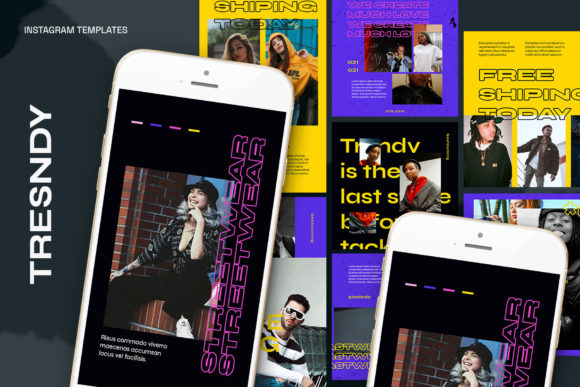
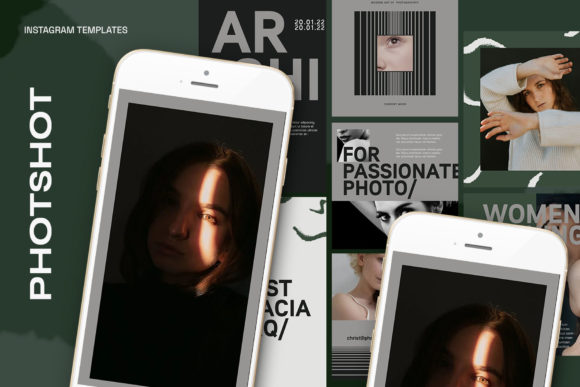
Creating a consistent and professional presence on Instagram can feel like a full-time job. Between planning content, writing captions, and actually designing graphics, the process is time-consuming. This is where high-quality Photoshop Instagram Templates become an essential part of your creative toolkit. They provide a structured, professional starting point, allowing you to focus on your message rather than wrestling with file setup and alignment. These templates are designed to streamline your workflow, ensuring every post looks polished and on-brand without requiring advanced design skills.
Understanding the Core Features: PSD Files and Smart Objects
The foundation of these templates is the PSD file, the native format for Adobe Photoshop. This format preserves all layers, effects, and editing capabilities, giving you complete creative control. The true power, however, lies in the use of Smart Objects. A Smart Object is a special layer type that acts as a container. For your images, this means you don't need to manually resize, crop, or distort your photos to fit a design. The template does the heavy lifting.
The process is designed for simplicity. You'll find a designated "image layer" within a layer group. By double-clicking the layer icon, you open the Smart Object's source file. Here, you simply place your own image, press CTRL + S to save, and return to the main template. Your photo will now be perfectly integrated into the design, maintaining its original quality and automatically conforming to the template's perspective or shape. This non-destructive editing method is a cornerstone of modern typography and design asset management, saving hours of manual adjustment.
Technical Specifications for Flawless Execution
Professional results depend on professional settings. These templates are built on a solid technical foundation to ensure your graphics are crisp and vibrant across all devices.
- 300 DPI: While primarily for digital use, a high dots-per-inch setting ensures your graphics are exceptionally sharp, especially if you ever repurpose them for printed materials like flyers or posters.
- RGB Color Mode: The standard for all digital screens, RGB (Red, Green, Blue) guarantees the colors in your design will display accurately on monitors, tablets, and phones.
- Optimized Dimensions: The templates come in two crucial sizes: 1200 x 1200 pixels for the classic Instagram square post, and 1920 x 1080 pixels for Instagram Stories, Reels, and other full-screen formats. This covers the most impactful real estate on the platform.
Streamlining Your Creative Workflow
The primary benefit of using these Photoshop Instagram Templates is the dramatic reduction in production time. What once took an hour of setup can now be accomplished in minutes. This efficiency is a game-changer for small business owners, marketers, and content creators who need to maintain a regular posting schedule. The "easy to use" nature isn't just a tagline; it's a functional reality that removes technical barriers.
Furthermore, every element is customizable. All text is fully editable using the standard Text Tool, allowing you to change wording, fonts, sizes, and colors to match your brand's voice. This flexibility is vital for creating a cohesive brand identity. You can adapt the same template for a product launch, a customer testimonial, or a promotional sale, ensuring visual consistency that builds recognition and trust with your audience.
Practical Applications and Project Suitability
These templates are versatile design assets suitable for a wide range of projects. Consider using them for:
- Brand Marketing: Create uniform posts for announcements, quotes, and tips that align with your overall brand aesthetic.
- E-commerce & Product Showcases: Use the Smart Object feature to elegantly display product photos without complex editing.
- Blog & Content Promotion: Design eye-catching graphics to promote new articles, driving traffic from Instagram to your website.
- Personal Branding: Bloggers, influencers, and hobbyists can establish a polished, professional feed that stands out.
- Client Work: For designers and agencies, templates are a fantastic starting point for client social media packages, allowing for rapid prototyping and customization.
Choosing the Right Template and Best Practices
When selecting a template pack, think about your content strategy. Does your brand feel more minimalist, bold, or playful? Look for a style that complements your existing logo design and visual language. A good template should enhance your content, not overpower it. Test how your typical photos and brand colors look within the layouts before committing.
A key point to remember, as noted in the template specifications, is that models are not included. This is standard practice, as it allows you to use your own authentic imagery. The power of the template is in the layout and graphic design, not the placeholder photos. Your unique visuals are what will make the design truly yours.
By integrating these Photoshop Instagram Templates into your process, you invest in efficiency and quality. You move from spending time on technical setup to focusing on what matters: crafting compelling messages and connecting with your audience. It’s a practical, professional solution for anyone serious about their visual presence on Instagram.